Maintainer guidelines
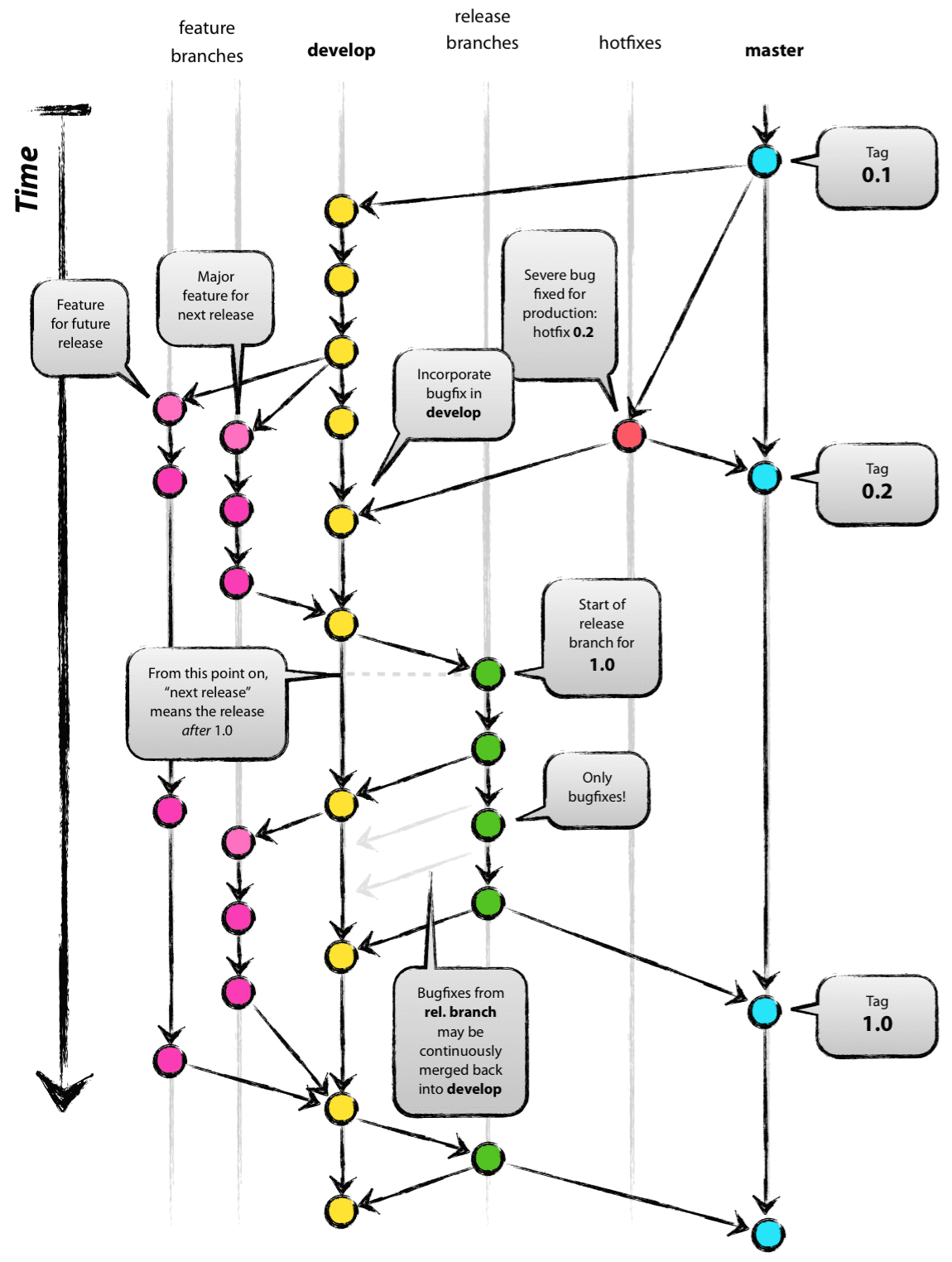
The git-flow workflow is summarised in the following graph, taken from Vincent Driessen's blog post. We largely follow this model, in which main ('master' on this figure) is reserved for releases and the default branch is develop. Toolbox releases distributed via Matlab are built from the main branch, and this is what most users are expected to use. If someone wants access to the latest features, they will need to check out and use the develop branch, therefore this branch should be in a usable state, even if it does not have the full, release-ready functionality. All other branches are for development purposes. As noted in the contributor guidelines, one difference between this model and the one we are using in k-Wave-II, is that contributors do not commit changes directly into develop or the feature branches, but they open Pull Requests (PRs) into them from their own forks of the repo.
Before coding
Maintainers should review issues regularly and place them appropriately in the repo project board, to be worked on immediately or in the future. Any issues to be worked on should have corresponding feature or bugfix branches opened.
Feature branches should branch off develop and bugfix branches off whichever is the most stable branch the bug is found in.
Development
All the branches of the repo are protected, meaning that contributors (including maintainers) cannot commit changes directly to them, they can only open PRs. Additionally, only maintainers can create branches in the main repo.
Therefore all development is done in contributors' forks, on branches that they have branched off feature branches or develop in their fork. When they are ready to merge their changes, they open a PR into the main repo's corresponding feature branch or develop, and request a code review from the maintainers or code reviewers.
When reviewing contributors' PRs, follow the checklist in the PR template, and check items off as you progress. You should check that
- New tests, tutorials and examples are added as needed.
- All tests, existing or new, pass.
- Documentation is updated and builds correctly.
You should also review the code changes themselves. Please be constructive and kind in your comments and support contributors to improve their code. When they have addressed your concerns resolve the conversation, and when you are satisfied with the code changes overall approve them.
If you think you need to take over development on someone else's PR, always ask them first.
Only maintainers can merge PRs into a feature branch or develop. Merges need at least one approving review and all the automated tests to pass. You should also make sure that you have ticked all the checkboxes on the template. Once all this is done you can merge, using squash merge. Individual commits will still be accessible on GitHub in the (now closed) PR.
Branch management
Once a feature reaches a certain maturity, maintainers can choose to merge the related branch into develop, to let adventurous users try it out. They will probably have to resolve some conflicts at that point.
Then development can continue in the feature branch, or if it is complete, the maintainers can lock the branch and prevent further commits to it. Feature branches should not be deleted (and cannot be deleted once locked).
The same workflow described above applies to bug fixes. However, the fix should be merged into all the affected branches, not only the one that the bugfix branch branched off from.
Releases
When the time comes to prepare a new release, open a new release branch from develop. From that point on, no extra feature developments should go into the release branch, only bugfixes. Any extra tests needed for a release should be run on the release branch (e.g. compatibility with the newest and all previous Matlab releases we want to support), and the Changelog, documentation, and release notes for the website updated accordingly.
Once the maintainers are satisfied with the release branch, squash merge it into the main branch, and add a new tag. You should also merge it back into develop, and any bugfixes into the affected feature branches as well.